To-Read sites – minor update

I’ve just updated To-Read sites Opera extension removing an annoying bug (site is not being deleted from list) and making visual improvements:

  • I changed badge color, because it was annoying for some of you.
  • Sites list haven’t been centered (it looked odd) – it looks fine now.
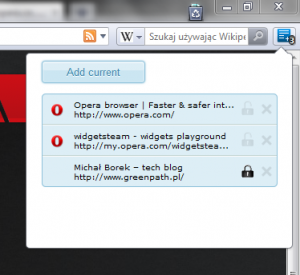
To-Read sites 2.1-2

New version will be available on http://addons.opera.com shortly.

Many of this extension users asked me about syncing – it’s in plans. But I really have no time to do it now, but I hope I will finish that soon, please be patient :-) .

Tags:

39 Responses to “To-Read sites – minor update”

  1. Alexander says:

    Hello Michał Borek.

    The big request.
    To make possibility to regulate window height.

    Sorry, very bad English

  2. Alexander says:

    …or make window height mo…

  3. Alexander says:

    …last added bookmark is on top list
    :)

  4. metude says:

    Could you add import/export option…

  5. Michał Borek says:

    Alexander it could be hard because of extension api constraints (but I’ll try to find a solution :) ). Thanks.

  6. Michał Borek says:

    metude: I’ll add it to “feature requests” list. I’ve got some other things on my list and I must finish it first.

    Thanks a lot for feedback.

  7. lifeh2o says:

    I got a very very unfortunate problem, this update installed as a new extension, all my saved sites are gone in this new version. :(
    I know some extensions automatically update themselves. Why not this updates by itself?

  8. Michał Borek says:

    lifeh2o: I guess it’s because older version could be created before updating was added by Opera. That’s why there is a problem with updating :/ New versions of To-Read sites should update automatically.

  9. Alexander says:

    Hello
    If you can not make the adjustment.
    Make it more length. The entire length of the screen.

    Thank! :)

  10. Tom says:

    I don’t know why but it doesn’t work for me :( i have the newest version of Opera as well as your extension, but it displays me an error message everytime i try to add site to list (Error: Please reload page and try again). I tried to reinstall several times but it still doesn’t work.

  11. Michał Borek says:

    Tom: You don’t need to reinstall it, but to reload page you want to add (if there are opened tabs during installation, they have to be refreshed).

    Please tell me if it worked.

  12. Lees says:

    It didn’t. It still shows error every time and never works.

  13. Tom says:

    It didn’t work for me either, but i completely removed Opera and installed it again a now it works fine. Thank you very much for this excellent extension !! :)

  14. olegweb says:

    Please add to your “feature requests” sorting or last visit data, renaming.

  15. rikaunite says:

    It seems not working after upgrade under linux version of Opera. click add does nothing, previous added pages disappeared but numbers on badge is correct.

  16. naoric says:

    Great extension! a key shortcut will make it perfect!

  17. Jouke van der Maas says:

    Very nice indeed. I would like it to load from instapaper as well, just add it there to if you click ‘add’, and remove it there if you’ve read it. If it gets added to instapaper, it get’s added to the list in this plugin too. Just something I would like because I go between devices a lot (laptop, iPad, iPhone, etc.)

  18. Fessoid says:

    It’s very useful, but it would be nicely if you add export/import functions like in extension “Tab Vault” =)

  19. chromax says:

    I have a suggestion how you could solve the import-export very simple.

    A sync with OperaLink would be very handy.
    Basically easy, the extension should only write the bookmarks into a default “read-to”-folder in the regular bookmarks of opera. So it would be automatically synced with OperaLink.

    And you would bypass the export/import problem, because everyone can handle the bookmarks as normal.

  20. Cryptochrome says:

    Is there any way to be able to add the functionality to the context menu? I would love to be able to right-click on a link with an option to add it to the list. The add-on works great so far. Thanks!

  21. elaine says:

    Does it support opera-link, or other sync way?

  22. faq says:

    May I just type some address to add items???

  23. Michał Borek says:

    ealine: not yet. But I plan to implement it.

  24. burak sezgin says:

    Hi!

    First of all, it’s a nice tool, thanks for it!
    just a little more intellectual idea as
    develop on the ruler, angle, line, or writing Wish I could
    sample image: link down
    http://img17.imageshack.us/i/adszkrd.jpg/

  25. stevie says:

    can you add locking capability to not see some saved links?

    tnx a lot

  26. Gene says:

    Very helpful extension! Do you know where (what file) extensions are stored in Opera? I keep losing my list of to-read sites with every clean install. Thanks,

  27. z says:

    Tnx. But where is the file with the list of sites?
    After installing Opera in Other folder I can’t find this list in old backup folder…

  28. Siarhei says:

    Отличное расширение.. По-моему не хватает только ручной сортировки списка (можно же дописать на jquery)

  29. bartex9 says:

    Michał, could you tell me where I can find a file where are my to-read sites? I’d like to manually move it to another pc.

  30. KT says:

    Nicely designed Opera extension for reading later, Michal…! ;)

    Would be great, as mentioned by others to sync with the Opera Link API (secure with double-encrypt key, and no cloud maintenance on your part).

    Btw, just noticed this link doesn’t save on the To-Read list (even after couple reloads).
    http://www.scripting.com/stories/2011/06/29/forTheRecord.html

  31. Gwen says:

    Please fix the problem with Opera standard font size greater 9 px.
    I use 12 or 14xp for more readability and therefore the content is cut off.
    The content should scale in the popup window.

  32. Danil says:

    Hi there! Very nice add-on.
    But very needed export-import!
    Or write how export to-read-sites list from one Opera to another Opera. Where I can find needed files and copy it to new computer. Urgently!

  33. Michał Borek says:

    Danil,
    I’ve just submitted to-read-sites 3.0 with export/import feature.

    Awaiting moderation…

  34. Michał Borek says:

    Danil you can download 3.0-2 version with export-import feature.

  35. Danil says:

    Thanks, Michael for this feature. I have move my to-read list from one computer to another. But little bugs detected:
    1) When export operation begins, then open window to save export file. Size of file is more-more gigabytes :) But saves adequate file. Minor bug.
    2) Some significant bug detected, when file has been imported. Russian chars in titles of list has been replaced by some unicode symbols, such as %u0420, %u0430, %u0431 and similar. Links imported correctly (russian links in list absent :) ).
    I think the next and final version must stay complete and ideal :)

  36. 08122011 says:

    Thanks for the earlier changes to the author on adding the ability to scale the window!

    But there is another need for adaptation of the extension.
    Noted the need to add features drag up – down links.
    I think if you click on the icon link, and drag it to the desired position in the list will be quite comfortable.

    Currently, the most frequently used links have peredobavlyat to display them at the bottom. I believe that my proposal will bring this wonderful extension to the more lucrative level!

    Thank you!

  37. Chris says:

    Hi
    Thanks for this nice&helpful Opera Extension!

    I have a feature request: A Preference to automatically lock all newly added sites

  38. Michał Borek says:

    Thanks Chris, I’ll consider this feature!

  39. Michał Borek says:

    Chris, feature requested by you has been introduced in version 4.1

Leave a Reply